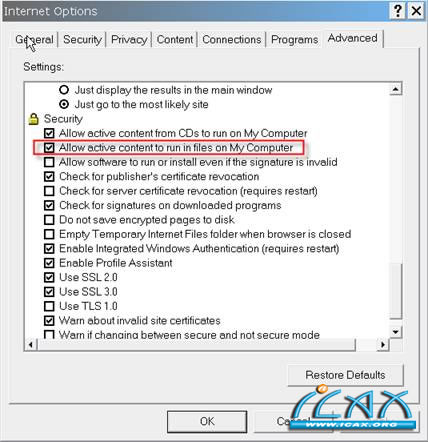
在Internet Explorer 8 中无法进入帮助文档 问题/症状: 当用户要进入NX的帮助文档时,得到一个警告错误。用户使用的版本是Internet Explore 8,Win XP 64 bit的操作系统。 解决方法: 打开internet explorer 选择 Tools -> Internet Options -> Advanced tab,拉下Security section 然后选择”Allow active content to run in files on My Computer”。在Internet Explorer 7,这个选项是不用手工选上去的。
|
QQ 咨询|手机版|联系我们|iCAx开思网
( 粤ICP备2025491344号-1 ) 
GMT+8, 2026-7-12 11:54 , Processed in 0.038741 second(s), 7 queries , Gzip On, Redis On.
Powered by Discuz! X3.3
© 2002-2025 www.iCAx.org